Layout, switches, build, connectivity. Each of those decisions changes how the keyboard feels from the beginning and whether you still like it in a few years. This gaming keyboard buying guide covers what to look for in a gaming keyboard and how the current LORGAR lineup maps onto each of them.
Layout and size
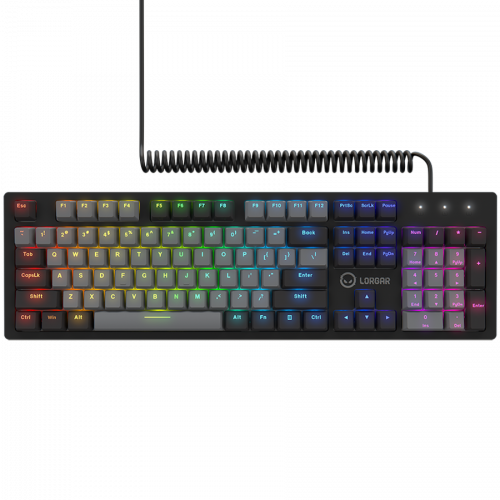
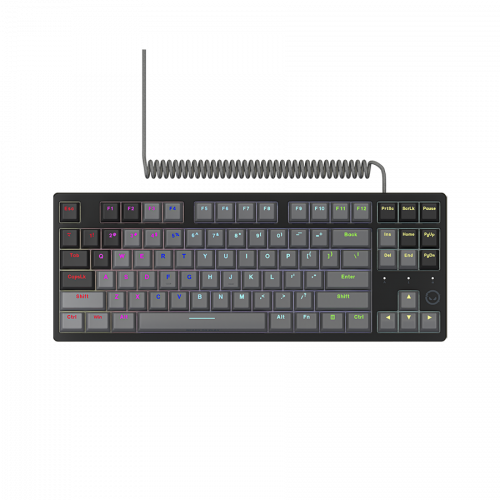
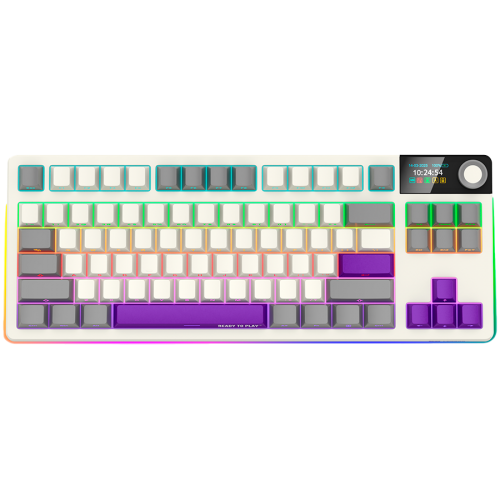
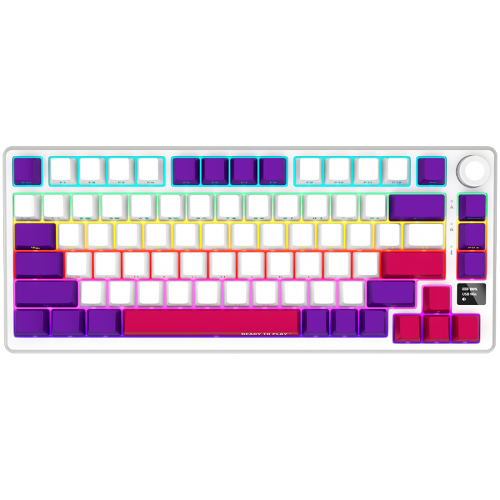
Keyboard sizes are generally described by what gets removed from the full layout. A full-size keyboard has 104 keys: alphanumeric block, function row, navigation cluster, and numpad. Drop the numpad and you get a tenkeyless (TKL) at around 87 keys. Shrink the navigation cluster and you arrive at the 75% format, which typically runs 82 to 84 keys; LORGAR’s 75% keyboard has 81 keys with the arrows tucked into the right edge. Pull out the dedicated navigation cluster entirely and you’re at 65% (typically 65 to 68 keys; LORGAR’s 65% keyboard has 66 keys, arrows preserved). Go smaller again, lose the arrows, and you have a 60% keyboard. There is also 40% with only letter keys, space and most used modifiers left, but that’s an extreme category.
| Full-size | TKL | TKL | 75% | 65% |
|---|---|---|---|---|
 |
 |
 |
 |
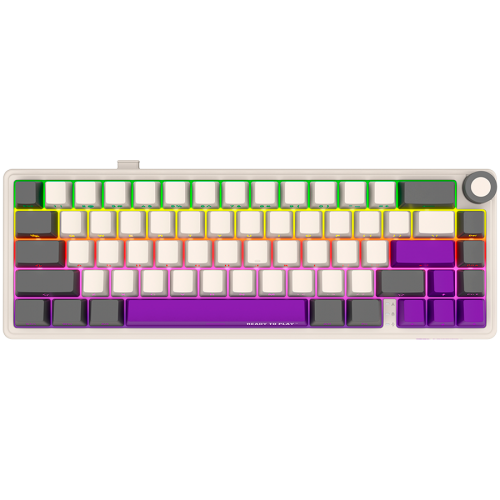 |
| Advanced Azar 514 | Advanced Azar 514TKL | Pro KBP70TKLW | Pro KBP7075W | Pro KBP70MW |
The trade-off is desk real estate against direct key access. Full-size is the obvious pick for anyone who works with numbers: accounting, data entry, anything that benefits from a dedicated numpad. TKL gives a competitive shooter or MOBA player back the mouse-swing room without sacrificing function keys or arrows. 75% squeezes a similar key count into an even smaller footprint by removing the gaps between blocks, but the trade-off is exactly the familiarity of the layout. 65% exchanges the function row for portability. The F-keys remain accessible through a Fn layer, which means the user has to press two keys instead of one dedicated.
Deciding on a size of a keyboard for gaming is mostly about desk space. If you don’t know which size you want, look at how you actually use the right side of your current keyboard. If the numpad sees daily use, stay full-size. If it sits unused, you’ll get the desk space back by going smaller. If you’re OK with some secondary keys placed a bit atypically, peculiarities of 75% layout will not become a problem.
The LORGAR Azar 514 covers the full-size end of the lineup with 104 keys and a magnetic top cover that swaps between a classic look and a skeleton design. The Azar 514 TKL is the same keyboard family without the numpad. For wireless setups, the KBP7075W PRO handles the 75% format, and the KBP70MW PRO sits at 65% for anyone who wants the smallest LORGAR mechanical keyboard available. The KBP70TKLW PRO completes the size ladder with a wireless TKL.
| Model | Layout | Keys | Wired/Wireless |
|---|---|---|---|
| Azar 514 | Full-size | 104 | Wired |
| Azar 514 TKL | TKL | 87 | Wired |
| KBP70TKLW PRO | TKL | 87 | Wireless |
| KBP7075W PRO | 75% | 81 | Wireless |
| KBP70MW PRO | 65% | 66 | Wireless |
Switches
The switch is the mechanism that registers a keypress. There are four broad families worth knowing about.
Membrane switches use a rubber dome that collapses when you press a key. They’re cheap, quiet, and have a soft, slightly mushy feel. Most office keyboards use them. They wear out faster than the alternatives and don’t give you the precise actuation point a competitive player wants.
Mechanical switches use a spring-loaded plastic stem inside a housing. The contact point is mechanical, not rubber, which means a consistent feel across millions of presses. Mechanical switches come in three flavors in terms of their feedback: linear (smooth top to bottom, no bump), tactile (a small bump at the actuation point), and clicky (a bump plus an audible click). Linear is the standard pick for gaming because no resistance interrupts your input. Tactile and clicky are more popular with typists who want feedback on every keypress. Any flavor can become silent, which means extra measures to lower the noise, and yes, there are even silent clicky switches on the market. The actual selection possibilities are endless because there are hundreds of various switches from dozens of manufacturers.
Optical switches take a different approach. The metal contact is replaced with an infrared beam, which the keypress interrupts to register input. The advantage is debounce-free actuation and a slightly faster theoretical response. The downside is that not every optical switch family is hot-swappable, and the feel tends to be very specific to the manufacturer’s design.
Magnetic, or Hall-effect, switches use a magnet and a sensor to detect how far down the key is pressed. Some Hall-effect keyboards let you set the actuation point anywhere from 0.1 mm down to a full press of around 4 mm. The lowest setting gives a hair-trigger; the highest matches the depth of a conventional switch. Because no metal contact is involved, Hall-effect switches don’t wear out the way mechanical ones do, and their rated lifespan tends to be far higher. The technology is still new to mainstream gaming, and the sensors and control circuitry cost more than conventional mechanical switches.
A separate consideration is hot-swap. A hot-swap socket lets you remove and replace the switch without soldering. The keycap puller takes the cap off, the switch puller pulls the switch out, and a new switch drops into the socket and clicks into place. The use case is twofold. You can try different switch families (linear, tactile, clicky, silent, different actuation forces) without buying a new keyboard. And if a single switch fails after years of use, you replace just that one. On a non-hot-swap keyboard, both scenarios mean a soldering iron or a new keyboard.
LORGAR’s lineup uses two switch families. The Azar 514 and Azar 514 TKL use linear Dream Switches with a 40 g actuation force, a 2 mm actuation point inside a 4 mm total travel, and a rated 50-million-cycle lifespan. That curve is what most gamers learn to like quickly: light enough to be fast, deep enough that you don’t trigger keys by accident.
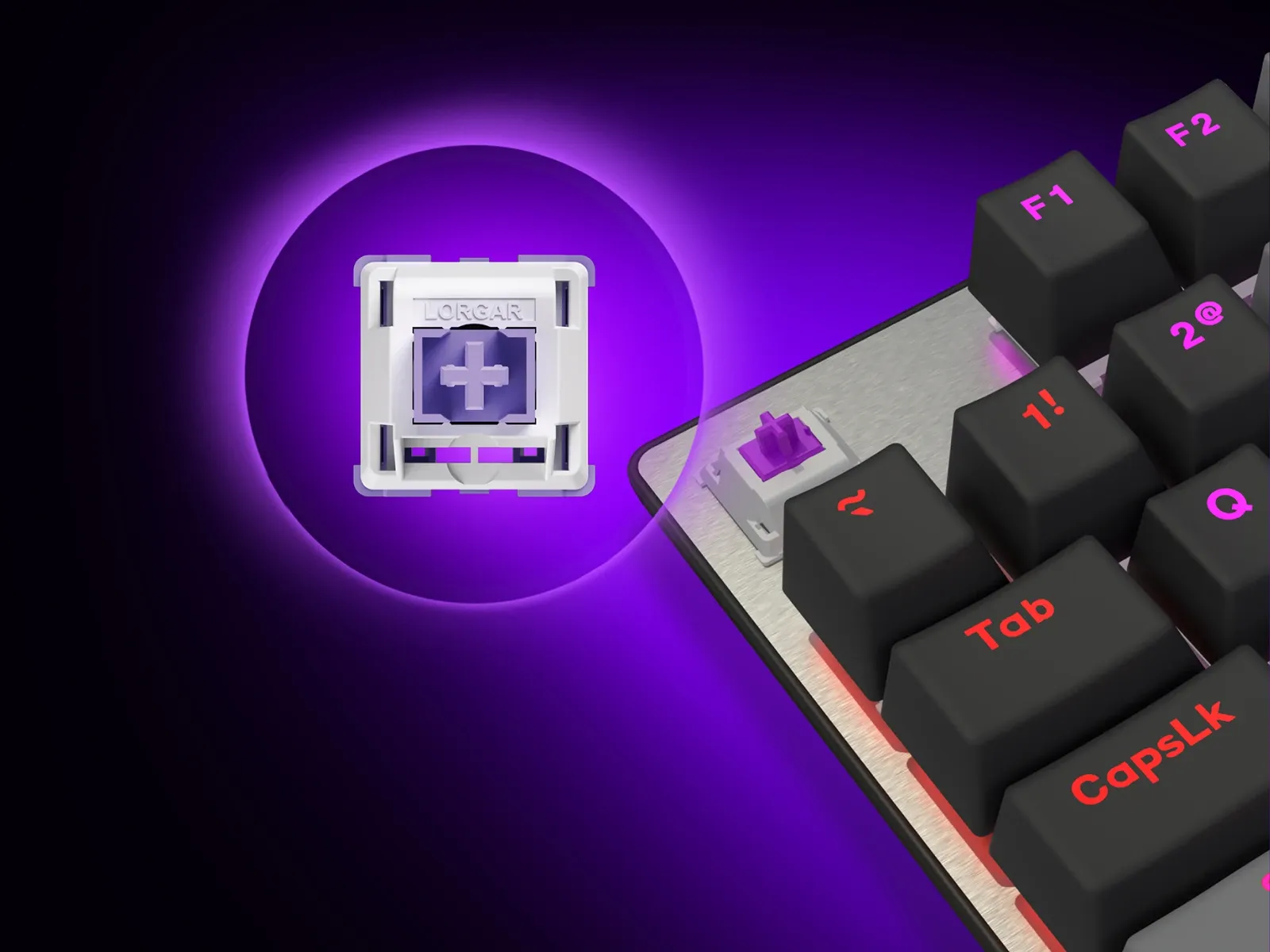
The KBP70 family (KBP70MW PRO, KBP7075W PRO, KBP70TKLW PRO) uses LORGAR Toxic Purple linear switches and adds hot-swap sockets. Spare switches and the puller are in the box, so swapping out a single switch (or trying a different feel) doesn’t require ordering anything extra.
Rollover and anti-ghosting
Press multiple keys at the same time and you might expect every one to register. On a cheap keyboard, that’s not always true. Ghosting is when a keypress that wasn’t made gets registered, because the keyboard matrix misreads simultaneous inputs. Anti-ghosting prevents this. Key rollover refers to how many simultaneous keypresses the keyboard can correctly read at once.
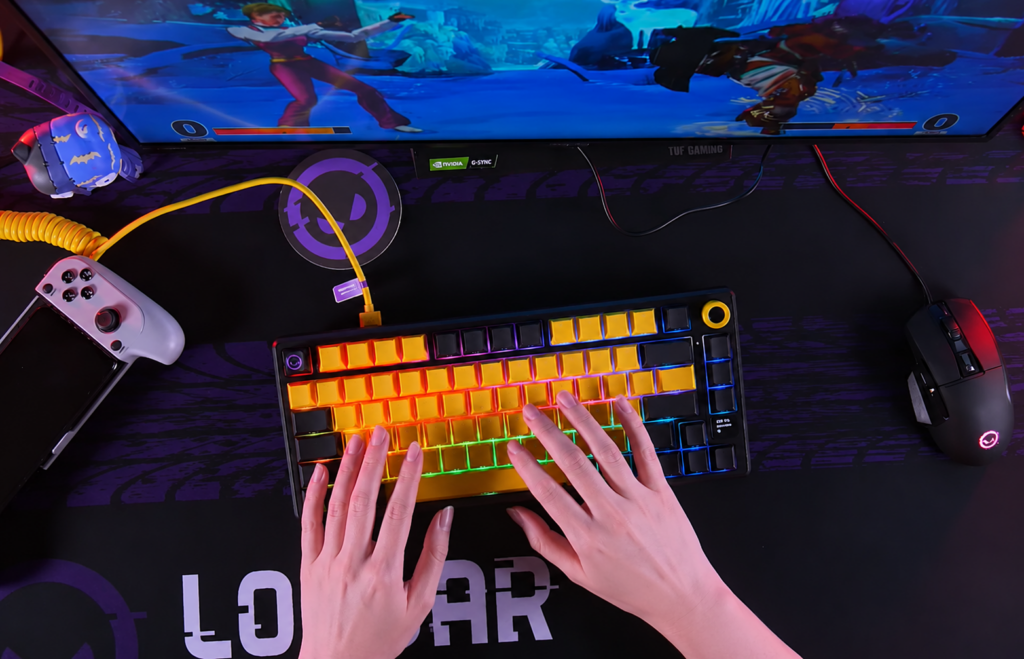
6-key rollover (6KRO) is the minimum standard on most modern keyboards. That’s enough for almost all everyday use, including most shooter combinations. N-key rollover (NKRO) means every key can be pressed and registered at the same time, up to the whole 100+! This matters for fighting games, rhythm games, MMO macro chains, or any situation where you might be holding three or four keys while pressing a fifth.
In the LORGAR lineup all keyboards support anti-ghosting and full NKRO. Every simultaneous keypress registers across the matrix. If you play titles where input combinations get complex (Tekken, osu!, some MMOs), you’re safe with LORGAR.
Wired or wireless
The wired versus wireless debate is mostly settled at the high end. Dedicated 2.4 GHz wireless protocols now match wired latency to within 1 ms, which is why pro players started to use wireless keyboards in tournaments. Modern Bluetooth (5.0+) runs 10 to 30 ms behind, which is fine for laptops, tablets, or consoles but not for competitive play. Note that the days of older BT shame, when keyboard latency could be in 100-200 ms range, are long gone but only if both the keyboard and connected device support modern protocol.
The real question is what you value. Wired keyboards never need charging, never drop a signal (not that it happens often with wireless), and tend to cost less. Wireless keyboards give you a cleaner setup and the ability to swap between devices. If you work at one desk and never move the keyboard, wired is fine. If you switch between a gaming PC, a work laptop, and a tablet, wireless makes things easier.
The Azar 514 family uses a USB-C connection with a removable spring cable: up to 3.4 m for the full-size and up to 2.3 m for the TKL. That’s enough for almost any desk arrangement.
The KBP70 family runs dual wireless. 2.4 GHz handles low-latency gaming and Bluetooth 5.0 covers everything else.
The KBP70TKLW PRO ships with a 7,200 mAh battery, the largest in the family. The KBP70MW PRO is rated for up to 416 hours on its 3,750 mAh cell, around 17 days of continuous use without backlighting.
| Model | Connectivity | Battery |
|---|---|---|
| Azar 514 | USB-C | — |
| Azar 514 TKL | USB-C | — |
| KBP7075W PRO | 2.4 GHz + BT | Battery |
| KBP70TKLW PRO | 2.4 GHz + BT | 7200 mAh |
| KBP70MW PRO | 2.4 GHz + BT | 3750 mAh / up to 416 h |
Build, sound, and feel
Three structural details separate a budget mechanical keyboard from a higher-end one: the mount type, the keycap material, and the stabilizers.
Mount type is how the switch plate sits inside the case. Tray mount is the cheapest. The plate screws directly to standoffs in the bottom case, and the result is a stiff, slightly hollow typing feel. Top mount, gasket mount, and other approaches isolate the plate from the case to varying degrees. Gasket mount, where the plate is held between strips of soft material, gives a softer typing feel with less high-frequency noise. It has become the standard for enthusiast-tier keyboards because it absorbs harshness without making the keyboard feel mushy. In addition, keyboards may have different sound dampening means added.
Keycap material is the second variable. ABS plastic is cheap and easy to mold, but it develops a greasy shine over time and the legends wear off. PBT is denser, more resistant to wear, and keeps its typical matte finish for years. If a keyboard is going to live on your desk for the long haul, PBT keycaps are the difference between a device that still looks new in three years and one that doesn’t.
Stabilizers are the third detail, and they’re often missed in spec sheets. Stabilizers (or “stabs”) are the small hardware that keeps long keys (spacebar, shift, enter, backspace) level when pressed off-center. Cheap stabilizers rattle and produce a hollow, plasticky sound on the spacebar even when the alphanumeric keys sound fine. Higher-end keyboards either ship with better stabilizers or leave them tunable so enthusiasts can lubricate and tune them. If a keyboard sounds noticeably worse on the spacebar than the rest of the keyboard, the stabilizers are why.
Sound and feel are the product of all three. A gasket-mounted keyboard with PBT keycaps, internal foam, and switches that don’t bottom out harshly produces a softer, more muted sound profile. A tray-mounted ABS keyboard with thin plates and minimal dampening produces the higher-pitched plastic clack that people associate with cheap mechanical keyboards. None of this affects how the keyboard performs in a game, but it affects whether you enjoy typing on it for several hours a day.
The LORGAR Azar 514 family is built on an aluminum base and top plate, which is the structural detail that allows the trick with the magnetic skeleton-cover.
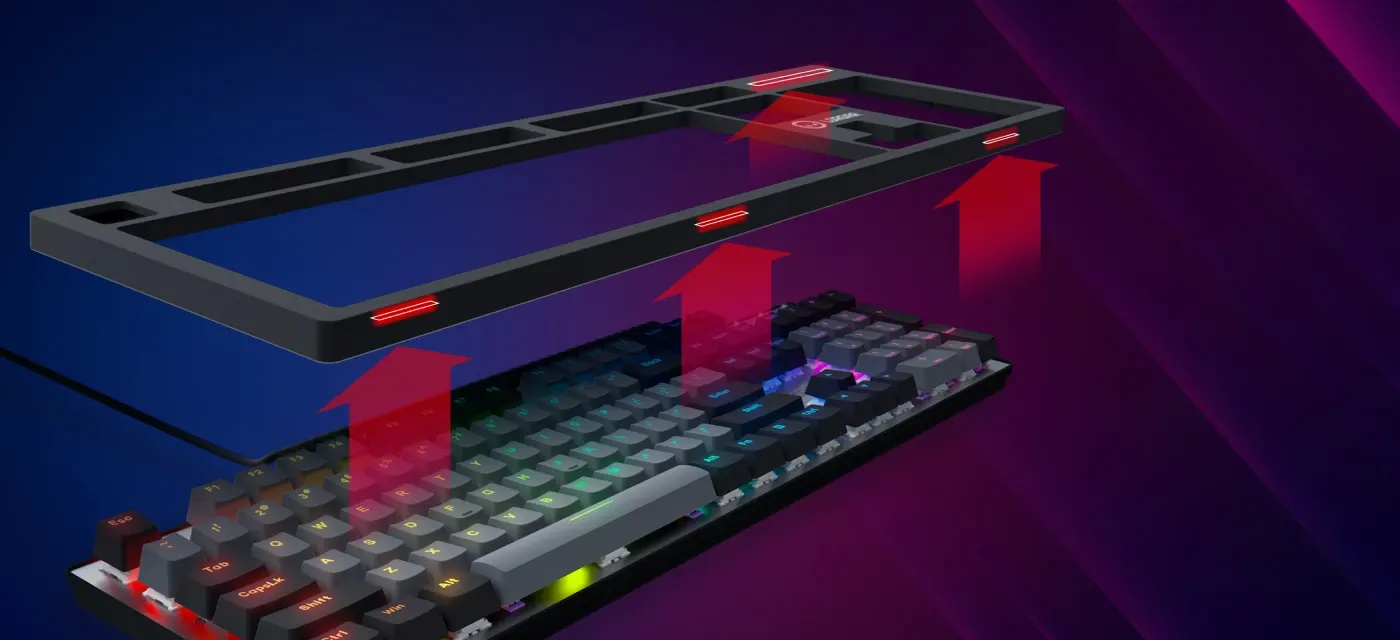
The KBP70 PRO series uses gasket-mounted construction with PBT keycaps in color-matched palettes. Each model ships in four variants: two black versions (with red and yellow accents), white, and beige.

The two families take different approaches. The Azar keyboards lean into solid, heavier, classical engineering. The KBP70 keyboards lean into the modern enthusiast formula of gasket mount, PBT, and hot-swap.
Lighting, RGB and software
Backlighting is the most visible feature of a gaming keyboard and the one people argue about most. Beyond one device, RGB can sync the lighting with other peripherals so the whole setup reads as one piece.
RGB stands for red, green, and blue, the three color channels an LED mixes to produce any shade in its range. In gaming hardware the term has long outgrown that literal meaning. Today it is shorthand for the whole category of customizable lighting: per-key addressable backlighting, animated and reactive effects, and per-zone control. On a keyboard the practical payoff is marking keys for a specific game, such as WASD for shooters, QWER for MOBAs, or the macro row for MMOs, rather than glowing one static color.
Every LORGAR keyboard works with the LORGAR PLATFORM, the brand’s configuration software. It handles key remapping, macro recording, lighting customization, and per-game profiles with automatic application detection. Macros can chain several keystrokes, actions, and timed delays into a single key, so a multi-step combo fires from one press. Key bindings are open, which means any key can carry a different function or in-game action. A built-in statistics module tracks your activity and lets you compare performance from one session to the next, and the lighting can sync across every connected LORGAR device, so a keyboard, mouse, and mousepad share one color scheme. Cloud sync keeps the settings consistent across machines, and LORGAR devices connect plug-and-play without a separate driver install.
A handful of higher-end keyboards now include small displays. These show battery level, active profile, system stats, or custom images. Whether you’ll use the screen depends on how you work. If you switch between several games and want a visible reminder of which profile is loaded, a screen is a practical addition. However, some users enjoy the decorative aspect of having a display on the keyboard by itself.
For displays specifically, the KBP7075W PRO has a built-in OLED status screen, and the KBP70TKLW PRO adds a 1.47-inch TFT panel along with a Multimedia Smart Knob for volume, scrolling, and application-specific shortcuts. If a screen sounds like something you’d actually look at, those are the two models to consider.
Picking the right keyboard
Here is the short version of how to choose gaming keyboard. Most of the decision comes down to two questions. How much desk space do you want to give the keyboard, and are you willing to charge it? If the answer is “all the space, never charge anything,” the Azar 514 is the straightforward choice. If you want the same Dream Switch feel without the numpad, take the Azar 514 TKL. If you want to go wireless, the KBP70 family covers three sizes (65%, 75%, TKL) with the same hot-swap switches, gasket mount, and PBT keycaps among them. The biggest screen and longest battery is on the KBP70TKLW PRO. The smallest in size is the KBP70MW PRO. The middle ground is the KBP7075W PRO.
| If you want… | Choose |
|---|---|
| Full-size wired | Azar 514 |
| TKL wired | Azar 514 TKL |
| Wireless TKL + biggest battery | KBP70TKLW PRO |
| Compact wireless 75% | KBP7075W PRO |
| Smallest wireless keyboard | KBP70MW PRO |
All five carry a 24-month warranty and run on the same LORGAR PLATFORM, so whichever keyboard you start with, your profiles and macros travel with you when you upgrade.